

How to Turn Off Google AI Overviews?
Did you know that Google AI sometimes gets your search intent wrong? If you’ve felt frustrated by irrelevant summaries, you’re not alone. Learning how to turn off these AI overviews can make your online experience better. In this article, we’ll discuss easy steps to disable this feature so you can find the exact information you need without any distractions.
While you can’t completely turn off Google AI Overviews in every instance, there are multiple effective alternatives available.
Can You Completely Turn Off Google AI Overviews?
No, Google does not currently offer a universal “off switch” to disable AI Overviews permanently. This means that users cannot fully turn off this feature across all platforms.
AI Overviews are designed to help users by summarizing information quickly. They pull together useful data and present it in a concise format. While this can be very helpful, some people might find them overwhelming or prefer not to use them at all.
You can, however, manage some settings in your Google account. This might limit the type of summaries you receive or how often they appear. But a complete shutdown is not an option at this time.
As AI technology evolves, Google may introduce more user controls in the future. For now, if you’re looking for a quieter experience, adjusting your preferences is the best way to go.
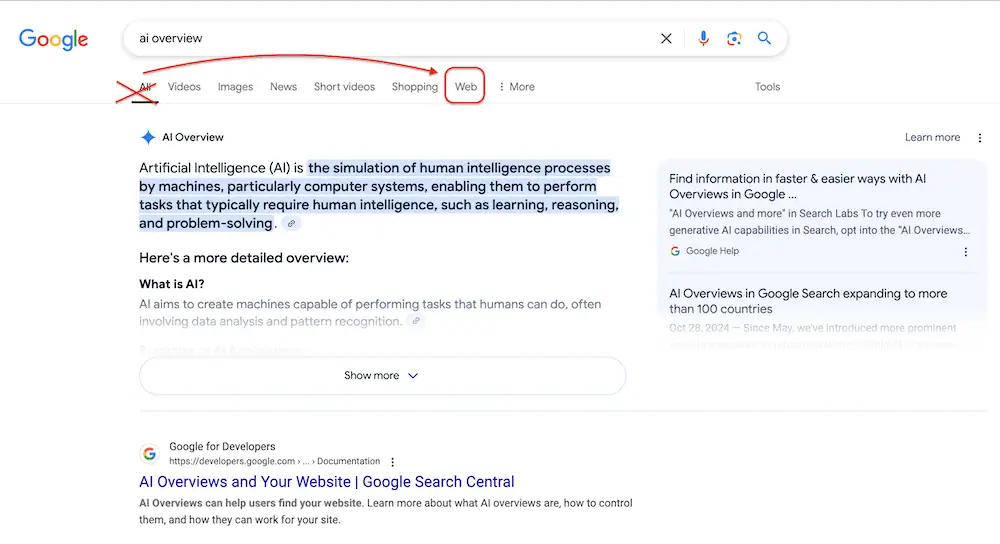
Method 1: Apply the “Web” filter in Google Search
This is the easiest solution, and it is even recommended by Google’s support team.
- Click “More” under the search bar after a search.
- Select “Web” to view basic link-only results.
- This action hides the AI summary box.
You have to repeat this process every time.
Method 2: Add “-ai” to your search query to refine the results
- Append “-ai” to your search queries.
- This excludes results labeled with “AI.”
- Helps refine search results for more relevant information.
- A simple technique to filter out unwanted content.

Method 3: Utilize a custom search engine with the UDM=14 technique
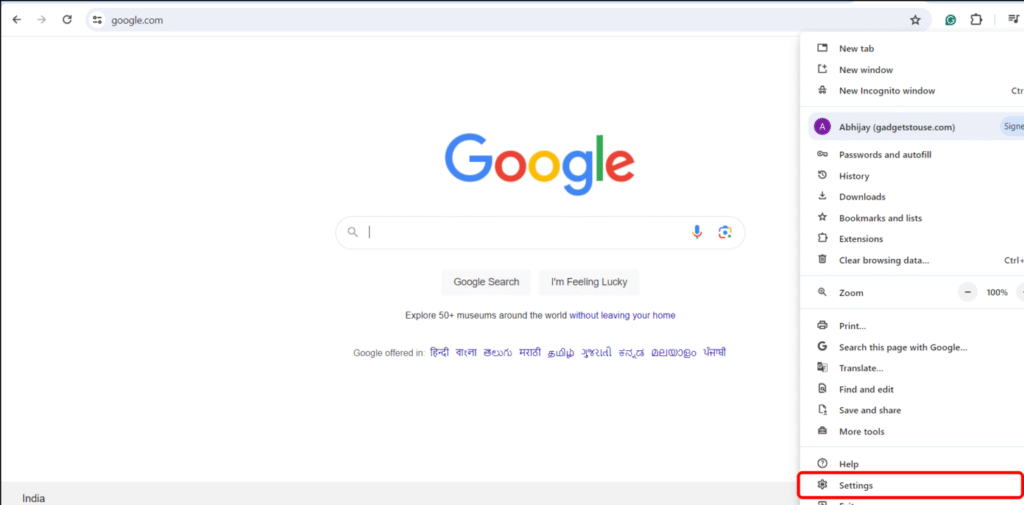
- Open Chrome settings.
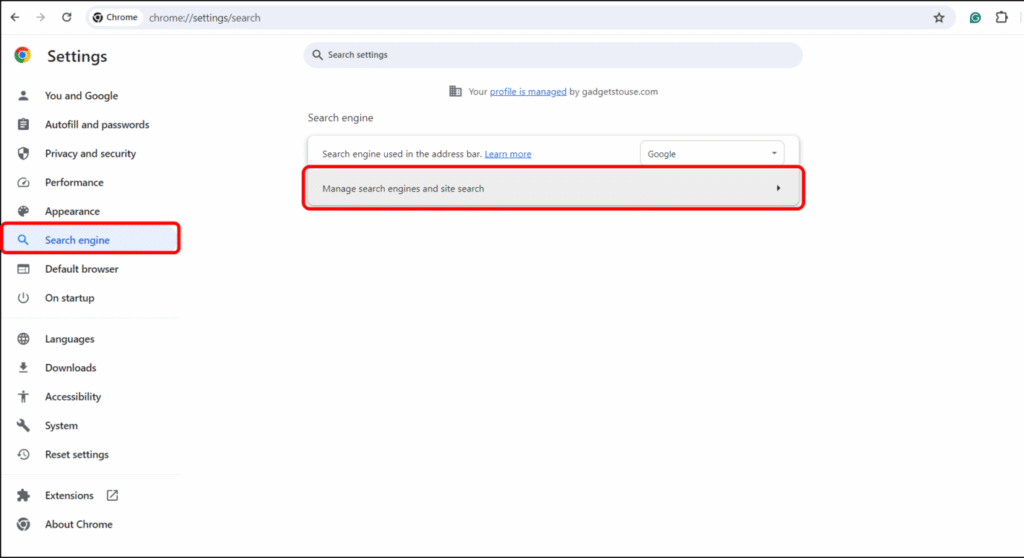
- Go to “Search engine.”
- Select “Manage search engines.”
- Configure your custom search engine.
- Now, scroll down to find “Site search” on your screen.
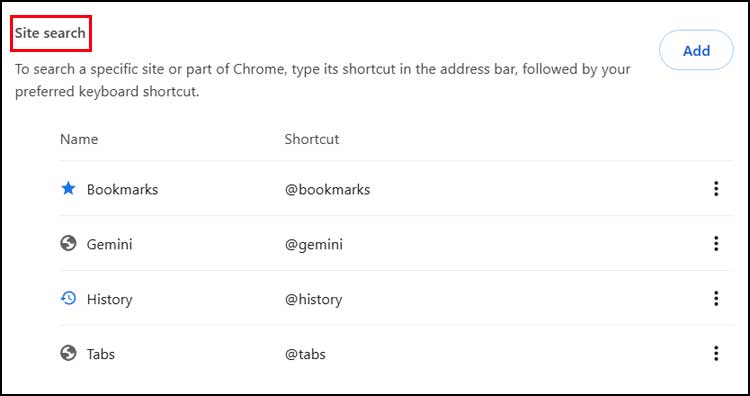
Create a new “site search” entry with the following details:
- Name: Choose any title you prefer (e.g., “Google AI”).
- Shortcut: Use a keyword like G@ or any other term you like.
- URL: {google:baseURL}search?q=%s&udm=14
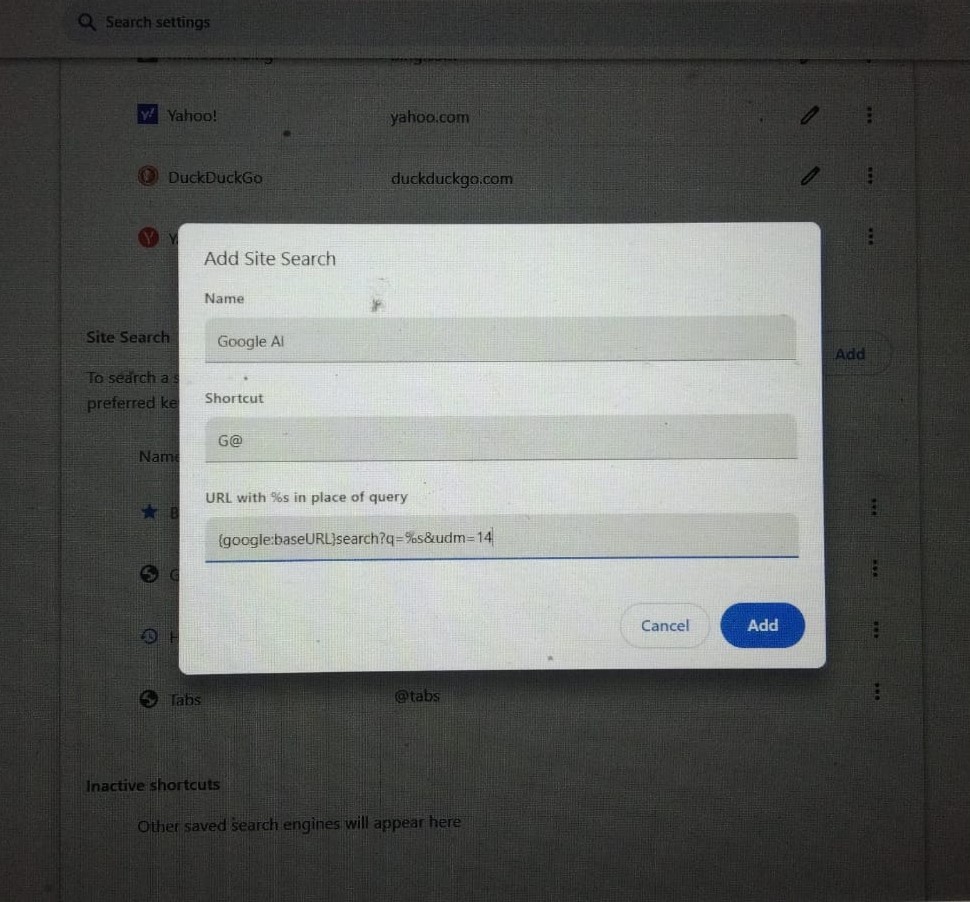
Set this custom search engine as your default. This way, when you perform a search, it will utilize this specific URL and is less likely to display AI Overview results.
Method 4: Utilize browser extensions for enhanced functionality
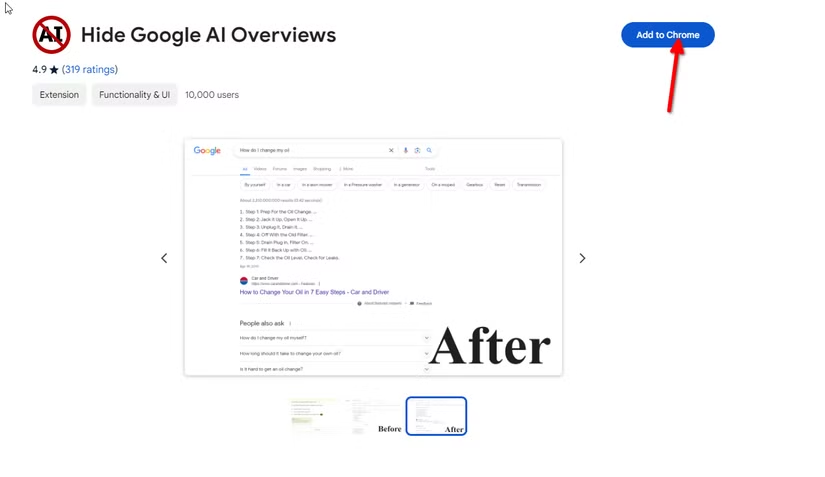
- You can find Chrome extensions that can hide the AI Overview part, such as “Disable AI Overview” or “Turn Off AI Overview” in the Chrome Web Store.
Another option available is “Turn Off Google AI Overview” also in the Chrome Web Store. - If you use uBlock Origin, which blocks ads and content, you can create custom filters to hide the AI Overview section.
- For instance, you could use this filter: google.com##.M8OgIe from How-To Geek.
Method 5: Disable Search Labs experiment
- Launch Chrome and visit Google Labs.
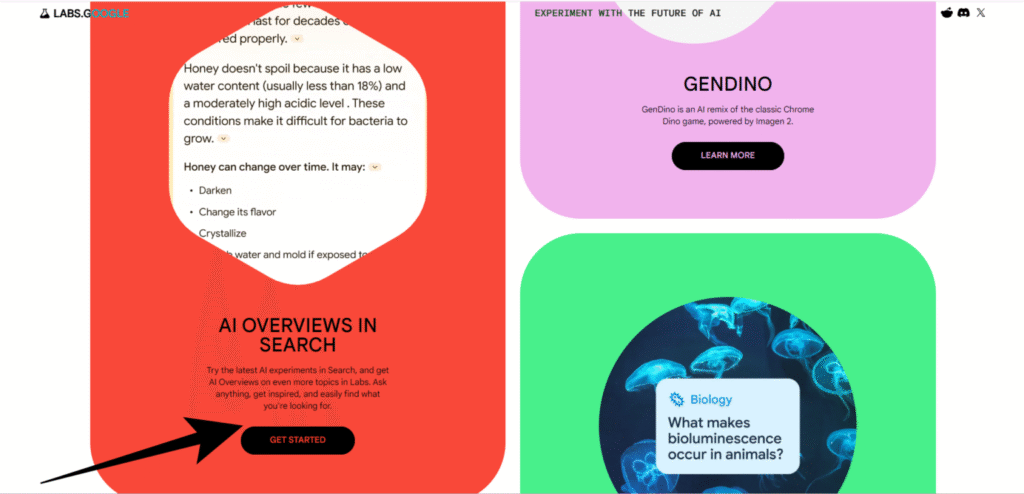
- Find the AI-Overview option on the homepage.
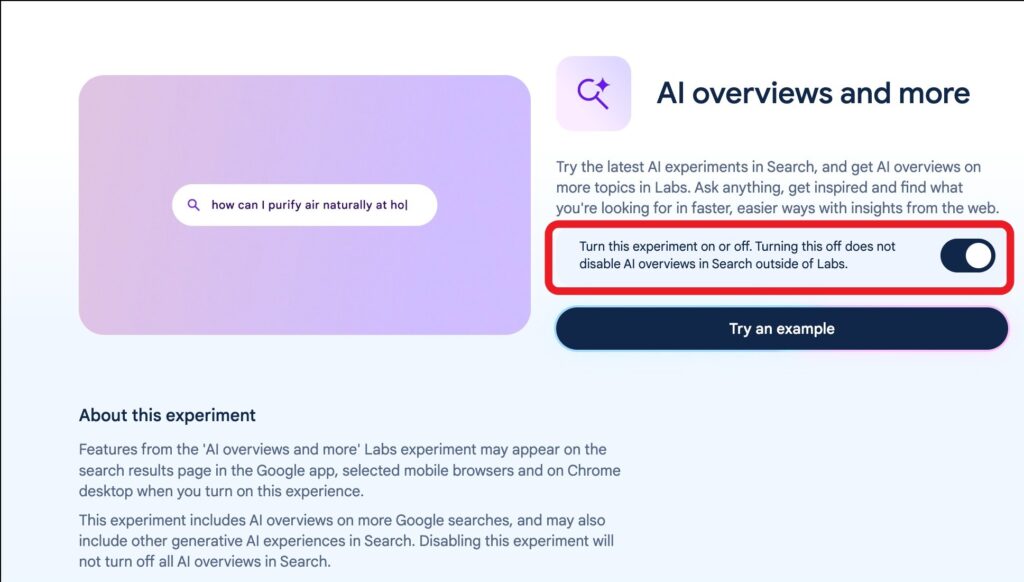
- Click on “AI Overviews & more” for experiments.
- Toggle off the AI Overview feature.
- A message informs you that disabling it won’t affect general AI Overviews in Search.
- You’ll see standard search results without AI.
- After disabling, Google will prompt for feedback.
- They seek your experience, reasons for disabling, and usability insights.
Method 6: Use incognito mode or browse while signed out
- Some claim AI Overviews may not show when users are logged out of Google accounts.
- Using Incognito or Private Browsing mode can be an effective alternative for searches.

Why Google Added AI Overviews
Google recently introduced AI overviews to enhance user experience. These summaries provide quick, digestible insights right from the search results.
The idea is simple: when you search for information, you often want quick answers. Instead of sifting through multiple websites, AI overviews gather key points in one place.
This feature helps users save time and effort. Imagine looking up a complex topic and instantly getting a clear summary instead of scrolling through several articles.
Moreover, these overviews are designed to be user-friendly. They break down complicated information into easy-to-understand snippets.
By adding AI overviews, Google aims to make the search process smoother and more efficient for everyone. This change reflects their commitment to improving how we access information online.
Pros of AI Overviews
- Efficiency: AI overviews can process and summarize vast amounts of information quickly, saving time for users.
- Consistency: AI provides uniform output, ensuring that key points are highlighted in a consistent manner across different documents.
- Accessibility: These overviews can make complex data more accessible to a wider audience, facilitating better understanding.
- Personalization: AI can tailor overviews to specific user needs or preferences, enhancing relevance and engagement.
- Continuous Improvement: AI systems can learn from user feedback, leading to ongoing enhancements in the quality of overviews.
Cons of AI Overviews
- Over-simplification: AI might oversimplify complex topics, stripping away important details that contribute to a well-rounded understanding.
- Lack of Context: AI may miss nuanced context or subjectivity that a human would understand, potentially leading to misinterpretation.
- Dependence on Data Quality: The effectiveness of AI overviews is heavily dependent on the quality of the input data; poor data leads to poor summaries.
- Job Displacement: Increased reliance on AI for summarization could lead to reduced demand for human researchers and writers.
- Biases in Algorithms: AI algorithms can inherit biases present in training data, which can skew the overview and misrepresent facts.
How AI Overviews Work Behind the Scenes
Artificial intelligence (AI) overviews are the result of complex algorithms processing vast amounts of data. At their core, these systems use deep learning techniques, which allow them to recognize patterns and make predictions based on the information they analyze.
When you input a query or request, the AI first breaks down your words into understandable components. This process involves natural language processing (NLP), which helps the AI comprehend the semantics and context of your request.
Next, the AI searches an extensive database, drawing on pre-existing knowledge and previously gathered data. Machine learning models utilize this information, continually adapting and improving as they encounter new data.
The AI then synthesizes the information, crafting a cohesive overview relevant to your needs. This final output is what the user sees, but it represents only a fraction of the complex processes that occur behind the scenes.
Ultimately, AI overviews combine advanced algorithms, data analysis, and language processing to deliver insights efficiently and effectively. As technology advances, these systems continue to evolve, enhancing their ability to assist users in real-time.
Educational Impact of AI Overviews
The integration of artificial intelligence (AI) into education is transforming traditional teaching methodologies. AI technologies are enabling personalized learning experiences, catering to the unique needs and preferences of each student.
One significant advantage is adaptive learning platforms, which adjust content and assessments based on individual performance. This tailored approach helps students grasp concepts at their own pace, enhancing overall comprehension and retention.
Additionally, AI tools facilitate immediate feedback, allowing educators to identify areas where students may struggle. This real-time insight promotes timely interventions, supporting better learning outcomes.
Furthermore, AI can automate administrative tasks, freeing up teachers to focus more on instruction and student engagement. This shift can lead to a richer classroom environment, where educators can devote more time to nurturing critical thinking and creativity.
Moreover, AI’s ability to analyze vast amounts of data can reveal trends in student performance, helping schools to improve curriculums and teaching strategies.
In essence, the educational impact of AI goes beyond mere technology; it fosters an innovative and responsive learning ecosystem that prepares students for the future.
Related topics:
How to turn off meta ai on Facebook, Instagram, WhatsApp and Messenger? – 2026
Conclusion
Some think AI Overviews might not show up for users logged out of their Google accounts. However, search behavior can still provide useful insights. Using Incognito or Private Browsing mode lets users search without personalized algorithms affecting results, leading to a wider range of information. Even if the AI Overview is missing, users can still find relevant information through other methods. Explore these options to improve your online searches and gain new perspectives on topics you care about.
FAQs
What are AI Overviews and why are they important?
AI Overviews are summaries generated by artificial intelligence that provide users with concise information about their search queries, enhancing the overall experience by presenting relevant details quickly.
Will I see AI Overviews if I’m logged out of my Google account?
There is speculation that AI Overviews may not be as prevalent for logged-out users; however, valuable insights can still be obtained from broader search behaviors.
How can I search without personalized algorithms affecting my results?
Using features like Incognito or Private Browsing mode allows you to search without personalized results, providing a wider range of search outcomes.
What are the benefits of using Incognito or Private Browsing mode?
This mode helps maintain privacy and ensures that your previous searches and preferences do not influence the results you receive, leading to a more objective search.
If AI Overviews aren’t available, how can I still find relevant information?
You can access relevant information through alternative searching techniques, such as using specific keywords or exploring different search engines.